Sew Better, Sew Faster: Advanced Industry Techniques
$39.99
$8.00
You Save 80%
At a Glance:
In-depth Instruction; over 199 mins
On-demand video access anytime
Bonus downloadable PDF resources
Access to class Q&A
Item:W00462E
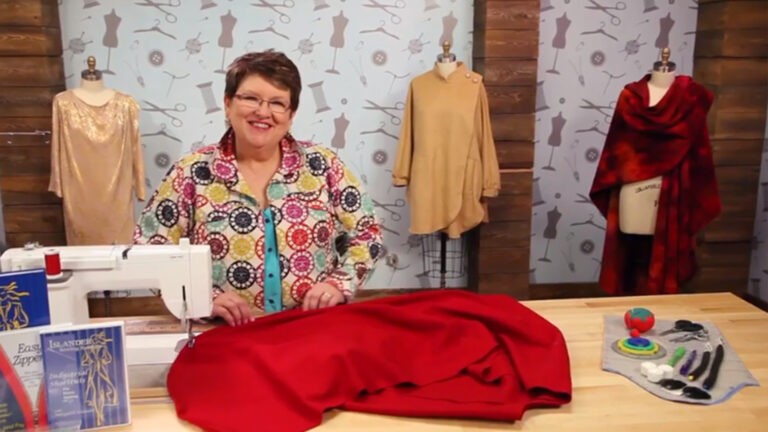
Consistently produce impeccable results as sewing expert Janet Pray teaches you the techniques used in high-end ready-to-wear. Cut tricky fabrics with confidence and stack-cut accurately. Mark darts and pockets with no tailor tacks or tracing wheels. Choose the best seam allowance for any sewing situation. Learn sewing ergonomics to work longer with less fatigue. Sew perfect straight and curved seams with no pins. Understand when, where and how to apply interfacings without wrinkles. Insert flawless slot and lap zippers on your first try. Sew beautiful, bulk-free waistbands and facings. Finish crisp seams and pristine hems quickly. Make your best sewing more polished, faster and more fun.
Meet your instructor, Janet Pray, owner of Islander Sewing Systems. Begin learning the secrets of industrial sewing right away as Janet discusses how to efficiently cut material for projects, even in multiple layers, and preserve your patterns to use again and again. You also see how to effectively mark your fabric and bundle project materials together.
Revolutionize your sewing with a new understanding of seam allowances and how you can modify them to speed up your process. In particular, see how using a smaller allowance on enclosed and curved seams can make your project look more professional. Janet discusses how to set up your work space to improve your comfort, then shares the industry technique for sewing without pins. You'll be amazed at how much time you save when you're not constantly pinning and unpinning your garment pieces!
Fusible interfacing is the key to properly stabilizing your fabric. Janet demystifies the stabilizing process as she reviews her favorite pressing tools and interfacing methods. Learn when, where and why to use interfacing and see how you can test your interfacing for successful results.
If inserting slot and lapped zippers has you quaking in your boots, fear no more! Janet shares quick and super-easy techniques for getting those zippers installed with a minimum of fuss.
Eliminate the frustration of attaching waistbands with Janet's helpful tips. She'll walk you through the traditional sport waistband and flat waistband, then show you how to apply skirt facings before installing the zipper for a perfectly smooth finish.
You can achieve perfect machine-sewn and bound buttonholes with just a little practice. Janet discusses optimal placement and shows how to get the right look on both men's and women's garments. Then she demonstrates how to thread-trace and sew a traditional bound buttonhole. If your garment has a facing, you'll see how to make the accompanying opening.
Finish up your garment with two popular, enclosed seams -- flat-felled and French -- and learn how to create a quick and easy hem on straight and curved edges. No pins required!
Janet Pray
Janet Pray is the owner of Islander Sewing Systems, which offers patterns and instruction for industrial sewing techniques. She's also the founder and president of The American Sewing Expo, the largest independent sewing expo in the United States. Janet served as the executive director of the National Sewing Council for three years, and she is the recipient of a Lifetime Achievement Award given by the Association of Sewing and Design Professionals.
Sew Better, Sew Faster: Advanced Industry Techniques - Supplies and Resources
Bonus Materials available for download after purchase.
Can I purchase a class to keep in my collection?
Yes, we do have a Shop where you can purchase classes to keep. Our Shop items are located under the Shop Tab.
How do I know what the Class covers?
Every Class has a free Preview video you can watch, to give you a flavor of the Instructor and the skills or project that will be covered. In addition, the Overview tab includes a thorough written description of the Class. And finally, each Class Session has a brief written summary of the content in that Session, including the length of each Session video. You will get a good feel for the Class content by reviewing these resources.
Do I have to be a Member of Craftsy to purchase a Class?
No you don’t. While Premium Members will receive regular offers for special deals on Craftsy content, Classes are not reserved exclusively for Members. If you buy a Class as a non-member, we’re sure you’d also enjoy having access to our full library of great projects and articles as a Member, so give it a try.
How do I purchase a Class?
First you should decide that the Class is what you want. Review the Class Preview video and the various written descriptions of the Class and each Session before you purchase, so you have a good understanding of the Class content. When you’re ready to purchase and gain access to the Class, simply click the “Add to Cart” button, and proceed through the Checkout process.
How do I access/view my Class?
Once you’ve paid, you can access/view your Class by going to the MY ACCOUNT section of Craftsy. The MY ACCOUNT link is in the upper right-hand area of the website. Within your MY ACCOUNT, a section labeled “My Content” is where the class you purchased will appear, including a link to watch the video of your Class. You’ll also receive an email confirmation after your purchase, which will include a link to view your Class. You can access your Class as many times as you wish, and you’ll never lose access to your Account information. Just be sure to “Log In” for access to MY ACCOUNT.
Do I have to take the Class right away?
No. Any Class you buy will be accessible to you always. You can view your Class whenever you want, and you can view individual Sessions in whatever order you like.
Is there a limit on the times I can view my Class?
No. Your access never expires. You can view any Class you purchase as many times as you want, whenever you want.
Can I view a Class on my tablet device or mobile phone?
No problem. Most newer-model smartphones or other mobile/tablet devices with an internet connection are able to play the Class videos. Simply Log In to Craftsy, and you can view any Class you’ve bought through the MY ACCOUNT section. Or, you can click on the “View Class” link within the email confirmation you’ll receive upon your purchase.
How do I get access to the Bonus Materials for the Class?
Until you purchase a Class, the Bonus material (any extra videos, download materials, etc.) will not be accessible. Once you purchase a Class, and go to view your Class, each individual Bonus element is accessible by simply clicking on each item. You’ll find the Bonus Materials directly below your main Class viewer frame. You can access the bonus materials as many times as you like and/or save them to your device.
How does the Class Q&A Resource benefit work?
Once you purchase any Class, within the Class viewing page, you’ll have access to post a question, comment or tip in the Class Discussions. This is not a “live chat,” but Craftsy contributors will answer posted questions and provide tips regularly. You can also view other Class participants’ questions and input to take part in this virtual dialogue among others who have taken the Class and are willing to share tips, answers, or ideas.
Can I print out Class details?
For any Bonus Material that is a PDF Download, yes you can. Just click on the icon/button for the Bonus element you want and print with your local printer.
What are PDF downloads?
These are simply documents, plans, or written materials that are formatted in a way to print out and retain for reference. By simply clicking on the icon/link for any PDF Download that is included with a Class, you can print that document on your own printer or simply view the contents on your computer/mobile device.
Are there any system requirements to view the Class video content?
Your Class video content is best when viewed on a computer manufactured in the past couple of years with a good broadband Internet connection (not dialup). We also highly recommend using the latest version of Firefox, Safari, or Chrome as your Internet Browser, though recent versions of Internet Explorer will work as well. The recommended screen resolution is 1024 x 768 or larger.
Why do you need my email?
We need it to acknowledge your purchase of a Class, and send you a confirmation of your transaction. Also, to maintain your permanent access to the Class videos, you’ll need to Log In to craftsy.com. We guarantee that we will not share your email with any third parties. You may receive email updates from Craftsy from time to time, with details of new Classes and updates. You can easily unsubscribe when you receive any email.
Can I get a refund if I don’t like the Class?
Because you’ll have full access to all the materials and content that is presented in the Class immediately, we can’t offer a refund after purchase. Please review the Class Preview video and the various written descriptions of the Class and each Session before you purchase, so you have a good understanding of the Class content.
How do I contact Craftsy?
If your question is about the Class content, please use the Contact Us Link – and you'll receive feedback from the Class Instructor. Even your fellow Class participants may jump in to offer tips and advice from their experience. If you have other questions or need help, you can email us at craftsy@program-director.net or call us toll-free, at 1-888-891-7203 . Customer Service Representatives will be available Monday-Friday, from 8:00 AM to 4:30 PM Central time, excluding normal holidays.
Explore Classes by Janet Pray
You may be interested in
Sign up for our free newsletter today
Get the latest crafting videos, tips, patterns and techniques delivered right to your inbox.