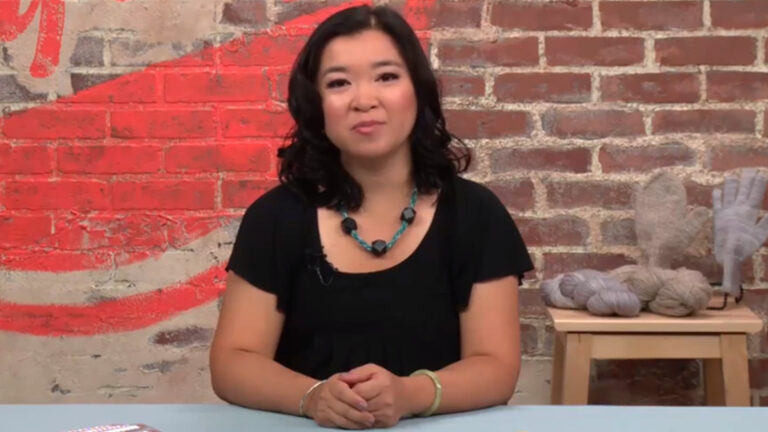
Get an expert hand learning how to knit beginner mittens and gloves! Join knitwear designer Angela Tong and conquer all the steps of knitting gloves and mittens in the round. During class, you'll create a pair of both mittens and gloves on double-pointed needles. Along the way, Angela will show you how to prepare for knitting your new accessories by identifying your size, following along in your pattern, taking accurate measurements and swatching. When you start knitting, you'll discover how to work the cuff, hand and thumb gusset to start both sets of accessories. For gloves, Angela will guide you through the fingers, and for mittens, you'll find out how to work the decreases to shape the tops. Plus, you'll see how to finish your projects by weaving in any ends and blocking for added shape and polish.
Meet Angela Tong, your guide to creating fun accessories that will keep your fingers toasty! Begin with an overview of double-pointed needles and yarn as well as the anatomy of mittens and gloves. Get tips for taking measurements (even on a fidgety toddler!), then master the stretchy long-tail cast-on.
A gauge swatch is your key to success with any project where size is critical. Angela demonstrates an easy way to swatch in the round and determine the right needle size to use. Learn two ways to cast on for your project and to avoid unsightly gaps, or laddering, as you knit in the round.
Begin knitting your mitten with Angela's guidance, reviewing pattern sizes and some common abbreviations. Cast on and knit the stretchy ribbed cuff using a smaller needle size for a snug fit. Then switch to larger needles for the hand section and learn a "make one" increase.
Use more increases to create the gusset, that small triangle of fabric that accommodates the base of your thumb. Then put the gusset stitches on hold to complete the hand, adding decreases to shape the top of the mitten. Finish the thumb with Angela's help and your mitten is done!
Gloves start out the same way mittens do, but Angela has chosen a finer yarn so you'll have less bulk between your fingers. Learn to knit with smaller needles as you work the cuff, hand and thumb gusset of your cozy and practical gloves.
Soon you'll have your knitting wrapped around your little finger. Angela shows you how to work each finger separately, while holding the rest of the stitches on scrap yarn. Then get some tips for finishing both mittens and gloves by closing gaps and weaving in ends.
Help your stitches relax and give your project a pleasing shape by washing and blocking it. Then learn how to personalize your work with different yarns, embellishments such as duplicate stitch, and a fingerless mitten variation. Angela shows you how!
Angela Tong
Angela Tong is a lifelong crafter with a soft spot for the fiber arts, but she's never met a craft she didn't like. And she's never taught a class that she didn't have a blast in! A certified instructor through the Craft Yarn Council of America, she leads workshops all over the New Jersey area and teaches classes online. You can find Angela's knitwear and crochet designs in magazines such as Knitscene and Knit Simple and in the book Knit Noro Accessories. You can also browse her work on her blog, Angela Tong Designs.
My First Mittens and Gloves - Patterns
Bonus Materials available for download after purchase.
Can I purchase a class to keep in my collection?
Yes, we do have a Shop where you can purchase classes to keep. Our Shop items are located under the Shop Tab.
How do I know what the Class covers?
Every Class has a free Preview video you can watch, to give you a flavor of the Instructor and the skills or project that will be covered. In addition, the Overview tab includes a thorough written description of the Class. And finally, each Class Session has a brief written summary of the content in that Session, including the length of each Session video. You will get a good feel for the Class content by reviewing these resources.
Do I have to be a Member of Craftsy to purchase a Class?
No you don’t. While Premium Members will receive regular offers for special deals on Craftsy content, Classes are not reserved exclusively for Members. If you buy a Class as a non-member, we’re sure you’d also enjoy having access to our full library of great projects and articles as a Member, so give it a try.
How do I purchase a Class?
First you should decide that the Class is what you want. Review the Class Preview video and the various written descriptions of the Class and each Session before you purchase, so you have a good understanding of the Class content. When you’re ready to purchase and gain access to the Class, simply click the “Add to Cart” button, and proceed through the Checkout process.
How do I access/view my Class?
Once you’ve paid, you can access/view your Class by going to the MY ACCOUNT section of Craftsy. The MY ACCOUNT link is in the upper right-hand area of the website. Within your MY ACCOUNT, a section labeled “My Content” is where the class you purchased will appear, including a link to watch the video of your Class. You’ll also receive an email confirmation after your purchase, which will include a link to view your Class. You can access your Class as many times as you wish, and you’ll never lose access to your Account information. Just be sure to “Log In” for access to MY ACCOUNT.
Do I have to take the Class right away?
No. Any Class you buy will be accessible to you always. You can view your Class whenever you want, and you can view individual Sessions in whatever order you like.
Is there a limit on the times I can view my Class?
No. Your access never expires. You can view any Class you purchase as many times as you want, whenever you want.
Can I view a Class on my tablet device or mobile phone?
No problem. Most newer-model smartphones or other mobile/tablet devices with an internet connection are able to play the Class videos. Simply Log In to Craftsy, and you can view any Class you’ve bought through the MY ACCOUNT section. Or, you can click on the “View Class” link within the email confirmation you’ll receive upon your purchase.
How do I get access to the Bonus Materials for the Class?
Until you purchase a Class, the Bonus material (any extra videos, download materials, etc.) will not be accessible. Once you purchase a Class, and go to view your Class, each individual Bonus element is accessible by simply clicking on each item. You’ll find the Bonus Materials directly below your main Class viewer frame. You can access the bonus materials as many times as you like and/or save them to your device.
How does the Class Q&A Resource benefit work?
Once you purchase any Class, within the Class viewing page, you’ll have access to post a question, comment or tip in the Class Discussions. This is not a “live chat,” but Craftsy contributors will answer posted questions and provide tips regularly. You can also view other Class participants’ questions and input to take part in this virtual dialogue among others who have taken the Class and are willing to share tips, answers, or ideas.
Can I print out Class details?
For any Bonus Material that is a PDF Download, yes you can. Just click on the icon/button for the Bonus element you want and print with your local printer.
What are PDF downloads?
These are simply documents, plans, or written materials that are formatted in a way to print out and retain for reference. By simply clicking on the icon/link for any PDF Download that is included with a Class, you can print that document on your own printer or simply view the contents on your computer/mobile device.
Are there any system requirements to view the Class video content?
Your Class video content is best when viewed on a computer manufactured in the past couple of years with a good broadband Internet connection (not dialup). We also highly recommend using the latest version of Firefox, Safari, or Chrome as your Internet Browser, though recent versions of Internet Explorer will work as well. The recommended screen resolution is 1024 x 768 or larger.
Why do you need my email?
We need it to acknowledge your purchase of a Class, and send you a confirmation of your transaction. Also, to maintain your permanent access to the Class videos, you’ll need to Log In to craftsy.com. We guarantee that we will not share your email with any third parties. You may receive email updates from Craftsy from time to time, with details of new Classes and updates. You can easily unsubscribe when you receive any email.
Can I get a refund if I don’t like the Class?
Because you’ll have full access to all the materials and content that is presented in the Class immediately, we can’t offer a refund after purchase. Please review the Class Preview video and the various written descriptions of the Class and each Session before you purchase, so you have a good understanding of the Class content.
How do I contact Craftsy?
If your question is about the Class content, please use the Contact Us Link – and you'll receive feedback from the Class Instructor. Even your fellow Class participants may jump in to offer tips and advice from their experience. If you have other questions or need help, you can email us at craftsy@program-director.net or call us toll-free, at 1-888-891-7203 . Customer Service Representatives will be available Monday-Friday, from 8:00 AM to 4:30 PM Central time, excluding normal holidays.
Explore Classes by Angela Tong
You may be interested in
Sign up for our free newsletter today
Get the latest crafting videos, tips, patterns and techniques delivered right to your inbox.