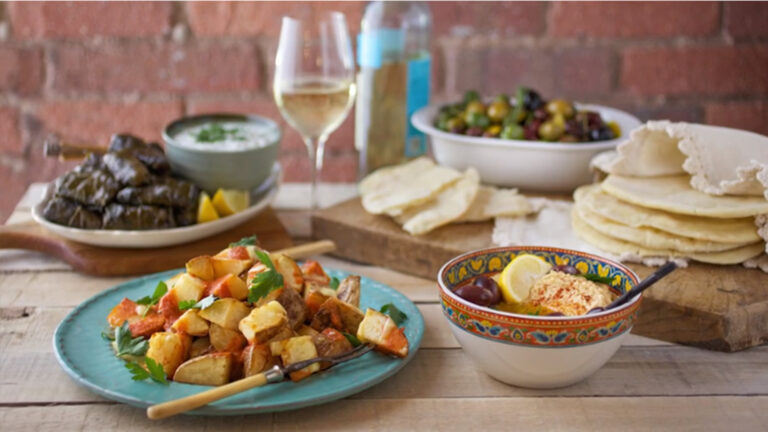
Learn how to make tapas, meze and antipasti with international instructor and TV personality Joanne Weir! Get insider tips for translucent caramelized onions as you make a decadent tortilla. Perfect the savory sauces that make crispy patatas bravas such a beloved tapas treat. Then, pick up tricks for perfectly cooked risotto as you make arancini packed with fresh mozzarella and smoky ham. Plus, you'll discover easy prep and go-to recipes for homemade pita bread and creamy hummus that double as party staples and healthy snacks. Finally, hand-roll succulent grape leaves full of aromatic rice, fresh dill and golden raisins. Add these classic tapas, meze and antipasti to your bag of party tricks and entertain with all the ease of the Mediterranean!
Meet your instructor, chef Joanne Weir, and learn a little about the history of tapas. Then dive right in with a caramelized onion tortilla. Unlike Mexican tortillas, this Spanish favorite is a pie made with eggs, similar to an omelet or Italian frittata.
Wow your dinner guests with the delectable patatas bravas. You'll roast and deep fry russet potatoes, then top them with a spicy tomato sauce and garlicky aioli. Yum!
Master the making of a classic Italian risotto that is delicious for dinner and even better when it's turned into arancini. These tasty antipasti morsels are stuffed with fillings such as chopped ham, fresh peas and smoked mozzarella and deep fried. In this lesson, Joanne walks you through the steps of getting the risotto just right.
Finish your arancini by preparing the filling, forming the morsels and breading them, then gently frying them. You can make these delicious treats ahead of time and fry them at the last minute; you'll have to fend off eager eaters with your spatula!
Who doesn't love warm pita bread fresh from the oven? It's so easy to make, too. Joanne shows how to mix up and knead the dough, then form and bake it. To go with your fresh pita, assemble some warmed olives with lemon zest and herbs.
Another delicious accompaniment for pita bread is a classic hummus dip. Follow along with Joanne as you sort, soak and simmer dried chickpeas, then combine them with olive oil, lemon juice, herbs and spices. Or jazz up your hummus by adding garlic and avocados to make it sumptuous and extra creamy.
If you love stuffed grape leaves, you'll be delighted to learn how to make this popular meze yourself. Joanne shares a vegetarian version that can be made well ahead of time, using jarred grape leaves or even your own! You'll make the filling, prepare the leaves, then fill and roll them up. They'll cook on your stovetop layered in a pot. They're perfect for a party or as a side dish for any Mediterranean meal.
Joanne Weir
Joanne Weir is a fourth-generation professional chef, internationally renowned instructor, award-winning author and TV personality. Her dedication to teaching earned her the very first IACP Julia Child Cooking Teacher Award of Excellence, and her first book, From Tapas to Meze, was selected by Julia as one of her personal favorites. In addition to teaching and cookbook writing, Joanne hosts an award-winning PBS series, Joanne Weirs Cooking Class as well as Joanne Weirs Cooking Confidence. She also writes for magazines such as Cooking Light, Bon Appétit and Food & Wine.
Mediterranean Favorites: Taps, Meze and Antipasti - Recipes
Bonus Materials available for download after purchase.
Can I purchase a class to keep in my collection?
Yes, we do have a Shop where you can purchase classes to keep. Our Shop items are located under the Shop Tab.
How do I know what the Class covers?
Every Class has a free Preview video you can watch, to give you a flavor of the Instructor and the skills or project that will be covered. In addition, the Overview tab includes a thorough written description of the Class. And finally, each Class Session has a brief written summary of the content in that Session, including the length of each Session video. You will get a good feel for the Class content by reviewing these resources.
Do I have to be a Member of Craftsy to purchase a Class?
No you don’t. While Premium Members will receive regular offers for special deals on Craftsy content, Classes are not reserved exclusively for Members. If you buy a Class as a non-member, we’re sure you’d also enjoy having access to our full library of great projects and articles as a Member, so give it a try.
How do I purchase a Class?
First you should decide that the Class is what you want. Review the Class Preview video and the various written descriptions of the Class and each Session before you purchase, so you have a good understanding of the Class content. When you’re ready to purchase and gain access to the Class, simply click the “Add to Cart” button, and proceed through the Checkout process.
How do I access/view my Class?
Once you’ve paid, you can access/view your Class by going to the MY ACCOUNT section of Craftsy. The MY ACCOUNT link is in the upper right-hand area of the website. Within your MY ACCOUNT, a section labeled “My Content” is where the class you purchased will appear, including a link to watch the video of your Class. You’ll also receive an email confirmation after your purchase, which will include a link to view your Class. You can access your Class as many times as you wish, and you’ll never lose access to your Account information. Just be sure to “Log In” for access to MY ACCOUNT.
Do I have to take the Class right away?
No. Any Class you buy will be accessible to you always. You can view your Class whenever you want, and you can view individual Sessions in whatever order you like.
Is there a limit on the times I can view my Class?
No. Your access never expires. You can view any Class you purchase as many times as you want, whenever you want.
Can I view a Class on my tablet device or mobile phone?
No problem. Most newer-model smartphones or other mobile/tablet devices with an internet connection are able to play the Class videos. Simply Log In to Craftsy, and you can view any Class you’ve bought through the MY ACCOUNT section. Or, you can click on the “View Class” link within the email confirmation you’ll receive upon your purchase.
How do I get access to the Bonus Materials for the Class?
Until you purchase a Class, the Bonus material (any extra videos, download materials, etc.) will not be accessible. Once you purchase a Class, and go to view your Class, each individual Bonus element is accessible by simply clicking on each item. You’ll find the Bonus Materials directly below your main Class viewer frame. You can access the bonus materials as many times as you like and/or save them to your device.
How does the Class Q&A Resource benefit work?
Once you purchase any Class, within the Class viewing page, you’ll have access to post a question, comment or tip in the Class Discussions. This is not a “live chat,” but Craftsy contributors will answer posted questions and provide tips regularly. You can also view other Class participants’ questions and input to take part in this virtual dialogue among others who have taken the Class and are willing to share tips, answers, or ideas.
Can I print out Class details?
For any Bonus Material that is a PDF Download, yes you can. Just click on the icon/button for the Bonus element you want and print with your local printer.
What are PDF downloads?
These are simply documents, plans, or written materials that are formatted in a way to print out and retain for reference. By simply clicking on the icon/link for any PDF Download that is included with a Class, you can print that document on your own printer or simply view the contents on your computer/mobile device.
Are there any system requirements to view the Class video content?
Your Class video content is best when viewed on a computer manufactured in the past couple of years with a good broadband Internet connection (not dialup). We also highly recommend using the latest version of Firefox, Safari, or Chrome as your Internet Browser, though recent versions of Internet Explorer will work as well. The recommended screen resolution is 1024 x 768 or larger.
Why do you need my email?
We need it to acknowledge your purchase of a Class, and send you a confirmation of your transaction. Also, to maintain your permanent access to the Class videos, you’ll need to Log In to craftsy.com. We guarantee that we will not share your email with any third parties. You may receive email updates from Craftsy from time to time, with details of new Classes and updates. You can easily unsubscribe when you receive any email.
Can I get a refund if I don’t like the Class?
Because you’ll have full access to all the materials and content that is presented in the Class immediately, we can’t offer a refund after purchase. Please review the Class Preview video and the various written descriptions of the Class and each Session before you purchase, so you have a good understanding of the Class content.
How do I contact Craftsy?
If your question is about the Class content, please use the Contact Us Link – and you'll receive feedback from the Class Instructor. Even your fellow Class participants may jump in to offer tips and advice from their experience. If you have other questions or need help, you can email us at craftsy@program-director.net or call us toll-free, at 1-888-891-7203 . Customer Service Representatives will be available Monday-Friday, from 8:00 AM to 4:30 PM Central time, excluding normal holidays.
Explore Classes by Joanne Weir
You may be interested in
Sign up for our free newsletter today
Get the latest crafting videos, tips, patterns and techniques delivered right to your inbox.