If you’ve always wanted to prepare gourmet meals for your friends and family but have been hesitant to try some of the more illustrious dishes, this class is for you! Fancy French names and longer ingredient lists don’t have to be daunting. In fact, some of the most impressive dishes are actually quite easy to prepare. I’m confident that once you watch this class, you’ll learn the tips and tricks needed to craft show-stopping meals all year long.
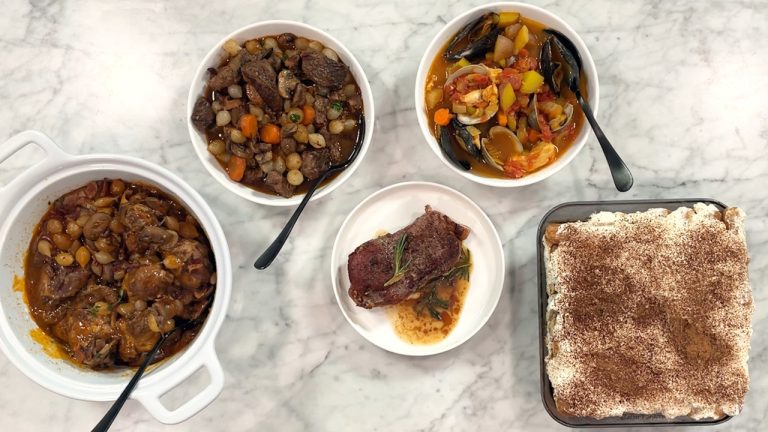
We start the class with Coq au Vin or simply put – chicken and wine. Tender chicken thighs and chicken drumsticks are braised in a savory red wine broth with mushrooms and pearl onions. A pop of smoky bacon adds great depth and complexity in the dish. The ingredient list is short and the process is easy. Next, we’ll whip up a classic Beef Bourguignon, the French beef stew that features plenty of vegetables and hint of Cognac. This ingredient list is a tad longer, but all items are easy to find at your local grocery store. Next, we’ll mimic the finest dish a steakhouse has to offer by preparing Garlic Butter Steaks. There are just four ingredients in this dish, but the result is perfectly cooked steak in a buttery, rosemary-infused sauce. And you can cook the steaks to your liking every time. We’re back to France for the next dish – Easy Bouillabaisse, the iconic fish stew that boasts clams, mussels, scallops, and white fish in fennel-infused, vegetable broth. This one pot meal is colorful, flavorful, and ready in a flash. We finish the class on a sweet note with Tiramisu, the Italian dessert that delivers sweet, coffee-soaked lady fingers under layers of rich mascarpone cream. A dusting of cocoa and this extraordinary dessert is ready to serve.
Five gourmet dishes, all easy to prepare and right at your fingertips.
All the flavors of the traditional dish, without all the work and multiple steps – that’s why I love this version of Coq au Vin. Juicy chicken and earthy mushrooms in a thyme-infused, red wine braising liquid. Easy, made in one pot, and perfect for a crowd.
Easy and Beef Bourguignon in the same sentence? Yes! You can make this classic dish with ease - it's actually a very simple process and the result is divine. Get ready to enjoy the most sumptuous braised beef and aromatic vegetables in a wine-infused broth.
Just like the steakhouse version, these juicy steaks are pan-seared and then basted with garlicky, melted butter! Super easy and ready in minutes.
The distinctive flavors of tomatoes, saffron, fennel, and orange, simmered with delightfully sweet-and-salty seafood and shellfish. An iconic dish, and the ultimate one-pot meal.
Spongy ladyfinger cookies, dipped in sweet espresso and layered with fluffy whipped cream and creamy mascarpone cheese. A quick dusting of cocoa and you’ve got the most incredible, sweet and creamy, homemade Tiramisu!
Robin Miller
Robin Miller has been a TV personality, food writer, and nutritionist since 1990 and she is the author of ten books, including the New York Times bestseller, Quick Fix Meals. Robin is currently writing and photographing her eleventh cookbook. Her popular show, Quick Fix Meals with Robin Miller, aired on Food Network for five years. All six seasons are currently streaming on Discovery+. Robin has two cooking shows streaming on Craftsy.com, Real Life Cooking and Efficient Weeknight Cooking. Robin also regularly hosts LIVE cooking classes and tutorials on the Craftsy platform.
Gourmet Made Easy
Bonus Materials available for download after purchase.
Can I purchase a class to keep in my collection?
Yes, we do have a Shop where you can purchase classes to keep. Our Shop items are located under the Shop Tab.
How do I know what the Class covers?
Every Class has a free Preview video you can watch, to give you a flavor of the Instructor and the skills or project that will be covered. In addition, the Overview tab includes a thorough written description of the Class. And finally, each Class Session has a brief written summary of the content in that Session, including the length of each Session video. You will get a good feel for the Class content by reviewing these resources.
Do I have to be a Member of Craftsy to purchase a Class?
No you don’t. While Premium Members will receive regular offers for special deals on Craftsy content, Classes are not reserved exclusively for Members. If you buy a Class as a non-member, we’re sure you’d also enjoy having access to our full library of great projects and articles as a Member, so give it a try.
How do I purchase a Class?
First you should decide that the Class is what you want. Review the Class Preview video and the various written descriptions of the Class and each Session before you purchase, so you have a good understanding of the Class content. When you’re ready to purchase and gain access to the Class, simply click the “Add to Cart” button, and proceed through the Checkout process.
How do I access/view my Class?
Once you’ve paid, you can access/view your Class by going to the MY ACCOUNT section of Craftsy. The MY ACCOUNT link is in the upper right-hand area of the website. Within your MY ACCOUNT, a section labeled “My Content” is where the class you purchased will appear, including a link to watch the video of your Class. You’ll also receive an email confirmation after your purchase, which will include a link to view your Class. You can access your Class as many times as you wish, and you’ll never lose access to your Account information. Just be sure to “Log In” for access to MY ACCOUNT.
Do I have to take the Class right away?
No. Any Class you buy will be accessible to you always. You can view your Class whenever you want, and you can view individual Sessions in whatever order you like.
Is there a limit on the times I can view my Class?
No. Your access never expires. You can view any Class you purchase as many times as you want, whenever you want.
Can I view a Class on my tablet device or mobile phone?
No problem. Most newer-model smartphones or other mobile/tablet devices with an internet connection are able to play the Class videos. Simply Log In to Craftsy, and you can view any Class you’ve bought through the MY ACCOUNT section. Or, you can click on the “View Class” link within the email confirmation you’ll receive upon your purchase.
How do I get access to the Bonus Materials for the Class?
Until you purchase a Class, the Bonus material (any extra videos, download materials, etc.) will not be accessible. Once you purchase a Class, and go to view your Class, each individual Bonus element is accessible by simply clicking on each item. You’ll find the Bonus Materials directly below your main Class viewer frame. You can access the bonus materials as many times as you like and/or save them to your device.
How does the Class Q&A Resource benefit work?
Once you purchase any Class, within the Class viewing page, you’ll have access to post a question, comment or tip in the Class Discussions. This is not a “live chat,” but Craftsy contributors will answer posted questions and provide tips regularly. You can also view other Class participants’ questions and input to take part in this virtual dialogue among others who have taken the Class and are willing to share tips, answers, or ideas.
Can I print out Class details?
For any Bonus Material that is a PDF Download, yes you can. Just click on the icon/button for the Bonus element you want and print with your local printer.
What are PDF downloads?
These are simply documents, plans, or written materials that are formatted in a way to print out and retain for reference. By simply clicking on the icon/link for any PDF Download that is included with a Class, you can print that document on your own printer or simply view the contents on your computer/mobile device.
Are there any system requirements to view the Class video content?
Your Class video content is best when viewed on a computer manufactured in the past couple of years with a good broadband Internet connection (not dialup). We also highly recommend using the latest version of Firefox, Safari, or Chrome as your Internet Browser, though recent versions of Internet Explorer will work as well. The recommended screen resolution is 1024 x 768 or larger.
Why do you need my email?
We need it to acknowledge your purchase of a Class, and send you a confirmation of your transaction. Also, to maintain your permanent access to the Class videos, you’ll need to Log In to craftsy.com. We guarantee that we will not share your email with any third parties. You may receive email updates from Craftsy from time to time, with details of new Classes and updates. You can easily unsubscribe when you receive any email.
Can I get a refund if I don’t like the Class?
Because you’ll have full access to all the materials and content that is presented in the Class immediately, we can’t offer a refund after purchase. Please review the Class Preview video and the various written descriptions of the Class and each Session before you purchase, so you have a good understanding of the Class content.
How do I contact Craftsy?
If your question is about the Class content, please use the Contact Us Link – and you'll receive feedback from the Class Instructor. Even your fellow Class participants may jump in to offer tips and advice from their experience. If you have other questions or need help, you can email us at craftsy@program-director.net or call us toll-free, at 1-888-891-7203 . Customer Service Representatives will be available Monday-Friday, from 8:00 AM to 4:30 PM Central time, excluding normal holidays.
Explore Classes by Robin Miller
You may be interested in
Sign up for our free newsletter today
Get the latest crafting videos, tips, patterns and techniques delivered right to your inbox.