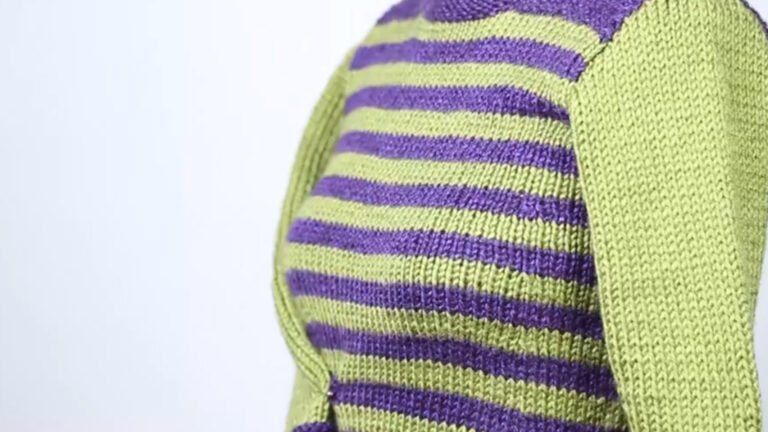
Set all your future projects up for finishing success! Join instructor Chris Bylsma as she guides you step by step through the basic skills you'll use again and again. During class, you'll learn to work three basic but sturdy seams: vertical, horizontal and combination. Once you're comfortable knitting seams, Chris shows you how to pick up stitches along your edges without any frustration or unnecessary counting. Want to finish your work with a special touch? You'll conquer steps for garter-stitch, ribbed band and reverse rolled edgings. Plus, you'll discover best practices for weaving in your ends, washing, blocking and storing your projects safely.
Designer Chris Bylsma loves teaching students to make knitted projects shine! Start by learning what finishing really means and see Chris' easy and effective steps to plan ahead for sleeker results. Plus, you'll get tips on preventing common problems.
Horizontal, or stitch-to-stitch seams, are considered the basic seams that provide stability and strength to your project. Chris shares not only how to work this seam on practice swatches, but also the incredibly easy secrets to correct mistakes such as jumped stitches in the seam.
Move on to vertical, or row-to-row seams. You'll get detailed instructions on how to compensate while seaming pieces that might not be the same size. Chris will even help troubleshoot situations such as seaming garter and textured knitting.
Combination seams do just what you might think: combine horizontal and vertical seaming along one edge. After a detailed demo, Chris will help you figure out compensating in combination seams and show you how to apply those skills on a real project: seaming a sleeve to a body.
After lots of seaming practice, it's time to learn to pick up stitches. Chris walks you through when and why you'd want to pick up stitches along a knitted edge, showing horizontal, vertical and combination edges. You'll learn to pick up stitches easily, without counting or frustration.
Learn three practical and sleek edges for the stitches you've just picked up. Garter stitch adds a simple and sturdy edge. Ribbed bands are great with flexible knits and purls. Reversed rolled edges are perfect for the neckband of a sweater.
Master essential finishing techniques and practical tips to care for your knitted treasures. From weaving in ends (see why Chris calls the seamed edges her 'California Closet') to washing, blocking and storage, ensure that your projects stay in great shape!
Chris Bylsma
Chris retired from a career in marketing communications and advertising to pursue her artistic passions, knitting and textureplay, and enjoy a little gardening with her husband, Charlie. Instead, she is having a wonderful time teaching workshops from coast to coast and beyond for TNNA, shops, guilds, cruises and conferences and has her own line of knitting patterns. She also has designed knit garments for the American Girl clothing line and has been featured in Vogue Knitting, Knit Simple, Creative Knitting and Knit n' Style. In her teaching role, Chris' reward is when knitters discover and trust their own creativity. She encourages knitters to "color outside the lines," where it's more fun! Chris firmly believes that knitting is not construction. Knitters should explore and make mistakes, feel free to change their minds and most of all, enjoy what they are doing.
Finishing Made Easy: The Beginner's Guide - Supplies and Instructions
Bonus Materials available for download after purchase.
Can I purchase a class to keep in my collection?
Yes, we do have a Shop where you can purchase classes to keep. Our Shop items are located under the Shop Tab.
How do I know what the Class covers?
Every Class has a free Preview video you can watch, to give you a flavor of the Instructor and the skills or project that will be covered. In addition, the Overview tab includes a thorough written description of the Class. And finally, each Class Session has a brief written summary of the content in that Session, including the length of each Session video. You will get a good feel for the Class content by reviewing these resources.
Do I have to be a Member of Craftsy to purchase a Class?
No you don’t. While Premium Members will receive regular offers for special deals on Craftsy content, Classes are not reserved exclusively for Members. If you buy a Class as a non-member, we’re sure you’d also enjoy having access to our full library of great projects and articles as a Member, so give it a try.
How do I purchase a Class?
First you should decide that the Class is what you want. Review the Class Preview video and the various written descriptions of the Class and each Session before you purchase, so you have a good understanding of the Class content. When you’re ready to purchase and gain access to the Class, simply click the “Add to Cart” button, and proceed through the Checkout process.
How do I access/view my Class?
Once you’ve paid, you can access/view your Class by going to the MY ACCOUNT section of Craftsy. The MY ACCOUNT link is in the upper right-hand area of the website. Within your MY ACCOUNT, a section labeled “My Content” is where the class you purchased will appear, including a link to watch the video of your Class. You’ll also receive an email confirmation after your purchase, which will include a link to view your Class. You can access your Class as many times as you wish, and you’ll never lose access to your Account information. Just be sure to “Log In” for access to MY ACCOUNT.
Do I have to take the Class right away?
No. Any Class you buy will be accessible to you always. You can view your Class whenever you want, and you can view individual Sessions in whatever order you like.
Is there a limit on the times I can view my Class?
No. Your access never expires. You can view any Class you purchase as many times as you want, whenever you want.
Can I view a Class on my tablet device or mobile phone?
No problem. Most newer-model smartphones or other mobile/tablet devices with an internet connection are able to play the Class videos. Simply Log In to Craftsy, and you can view any Class you’ve bought through the MY ACCOUNT section. Or, you can click on the “View Class” link within the email confirmation you’ll receive upon your purchase.
How do I get access to the Bonus Materials for the Class?
Until you purchase a Class, the Bonus material (any extra videos, download materials, etc.) will not be accessible. Once you purchase a Class, and go to view your Class, each individual Bonus element is accessible by simply clicking on each item. You’ll find the Bonus Materials directly below your main Class viewer frame. You can access the bonus materials as many times as you like and/or save them to your device.
How does the Class Q&A Resource benefit work?
Once you purchase any Class, within the Class viewing page, you’ll have access to post a question, comment or tip in the Class Discussions. This is not a “live chat,” but Craftsy contributors will answer posted questions and provide tips regularly. You can also view other Class participants’ questions and input to take part in this virtual dialogue among others who have taken the Class and are willing to share tips, answers, or ideas.
Can I print out Class details?
For any Bonus Material that is a PDF Download, yes you can. Just click on the icon/button for the Bonus element you want and print with your local printer.
What are PDF downloads?
These are simply documents, plans, or written materials that are formatted in a way to print out and retain for reference. By simply clicking on the icon/link for any PDF Download that is included with a Class, you can print that document on your own printer or simply view the contents on your computer/mobile device.
Are there any system requirements to view the Class video content?
Your Class video content is best when viewed on a computer manufactured in the past couple of years with a good broadband Internet connection (not dialup). We also highly recommend using the latest version of Firefox, Safari, or Chrome as your Internet Browser, though recent versions of Internet Explorer will work as well. The recommended screen resolution is 1024 x 768 or larger.
Why do you need my email?
We need it to acknowledge your purchase of a Class, and send you a confirmation of your transaction. Also, to maintain your permanent access to the Class videos, you’ll need to Log In to craftsy.com. We guarantee that we will not share your email with any third parties. You may receive email updates from Craftsy from time to time, with details of new Classes and updates. You can easily unsubscribe when you receive any email.
Can I get a refund if I don’t like the Class?
Because you’ll have full access to all the materials and content that is presented in the Class immediately, we can’t offer a refund after purchase. Please review the Class Preview video and the various written descriptions of the Class and each Session before you purchase, so you have a good understanding of the Class content.
How do I contact Craftsy?
If your question is about the Class content, please use the Contact Us Link – and you'll receive feedback from the Class Instructor. Even your fellow Class participants may jump in to offer tips and advice from their experience. If you have other questions or need help, you can email us at craftsy@program-director.net or call us toll-free, at 1-888-891-7203 . Customer Service Representatives will be available Monday-Friday, from 8:00 AM to 4:30 PM Central time, excluding normal holidays.
Explore Classes by Chris Bylsma
You may be interested in
Sign up for our free newsletter today
Get the latest crafting videos, tips, patterns and techniques delivered right to your inbox.