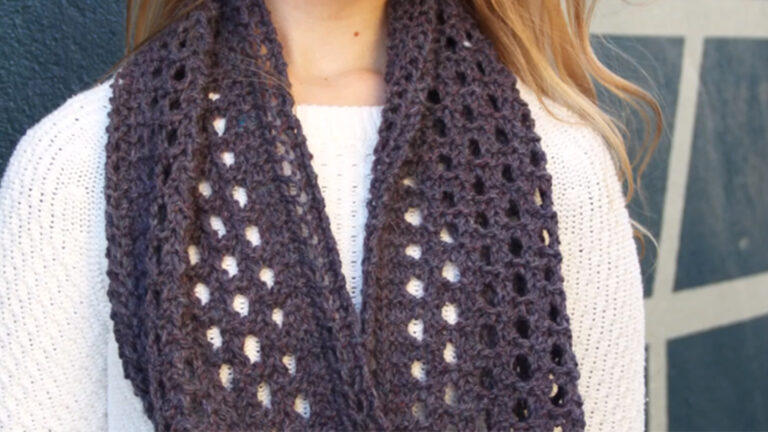
Use knitting expert Laura Nelkin's design worksheet along with any of twelve templates to build your own cowl designs with little to no math. You'll even be able to write publishable patterns. Laura will help you choose yarn, stitch patterns, borders and edgings before guiding you step-by-step through bringing a unique cowl to life. Design a cute, cozy round cowl, a sophisticated Möbius cowl or a fabulous flat cowl you can seam or connect with buttons. Along with all the tips and tricks you need to succeed at designing and knitting original cowls, this class also includes three of Laura's finished cowl patterns! Sign up today and radiate eye-catching style in custom cowls you can call your own.
Meet your instructor, Laura Nelkin, and begin to consider what design elements you want your cowl to have. A design worksheet included with your class materials will help you keep track of your choices and choose the best design template for your pattern.
Choosing the right yarn for your project means you get to shop in your stash or try out new fibers! Find joy in your swatching and blocking as you determine just the right stitch patterns and borders for your cowl.
Laura includes six different design templates for cowls that are knitted in the round. She walks you through the steps for calculating your cast-on, body stitches and edging for round cowls that are not twisted, using her Red Cowl as an example.
Twisted, or Möbius, cowls are round cowls that are knitted from the center out. Laura gives an overview of the basic Möbius design calculations, then demonstrates with her Lapso Cowl. You'll learn how you can move beyond the template boundaries to add your own twists to the base design.
Laura discusses the many ways you can design a flat-knitted cowl using the six provided templates. Even a simple rectangle with buttons can be a stunning accessory when you choose an interesting stitch pattern and add handmade buttons. See how Laura's Ojo Cowl was calculated by following along on the design template.
Your new favorite stretchy cast-on and bind-off might be the ones you learn in this lesson. Laura also demonstrates the Möbius cast-on and provisional cast-on and shares some cowl-blocking tricks.
If you plan to start designing cowl patterns to share or sell, you'll want Laura's professional tips. These include calculating yarn amounts, getting your pattern written out and charted correctly, and having your pattern edited and photographed. Soon you'll be crafting patterns designed to delight!
Laura Nelkin
Laura Nelkin lives in upstate New York, where the sunny season is short, leaving plenty of time for knitting indoors. Though she has a degree in apparel design, she took to knitting years ago and hasn't looked back. Today, she finds herself fascinated with beads and lace. Laura teaches all over the country, runs mystery knit-alongs and has her own line of knitting kits and self-published patterns. You can find them online, as well as in her book, "Knockout Knits."
Design Your Own Cowl - Design Worksheet
Design Your Own Cowl - Round Cowl Templates
Design Your Own Cowl - Flat Cowl Templates
Design Your Own Cowl - Red Cowl Pattern
Design Your Own Cowl - Lapso Cowl Pattern
Design Your Own Cowl - Ojo Cowl Pattern
Bonus Materials available for download after purchase.
Can I purchase a class to keep in my collection?
Yes, we do have a Shop where you can purchase classes to keep. Our Shop items are located under the Shop Tab.
How do I know what the Class covers?
Every Class has a free Preview video you can watch, to give you a flavor of the Instructor and the skills or project that will be covered. In addition, the Overview tab includes a thorough written description of the Class. And finally, each Class Session has a brief written summary of the content in that Session, including the length of each Session video. You will get a good feel for the Class content by reviewing these resources.
Do I have to be a Member of Craftsy to purchase a Class?
No you don’t. While Premium Members will receive regular offers for special deals on Craftsy content, Classes are not reserved exclusively for Members. If you buy a Class as a non-member, we’re sure you’d also enjoy having access to our full library of great projects and articles as a Member, so give it a try.
How do I purchase a Class?
First you should decide that the Class is what you want. Review the Class Preview video and the various written descriptions of the Class and each Session before you purchase, so you have a good understanding of the Class content. When you’re ready to purchase and gain access to the Class, simply click the “Add to Cart” button, and proceed through the Checkout process.
How do I access/view my Class?
Once you’ve paid, you can access/view your Class by going to the MY ACCOUNT section of Craftsy. The MY ACCOUNT link is in the upper right-hand area of the website. Within your MY ACCOUNT, a section labeled “My Content” is where the class you purchased will appear, including a link to watch the video of your Class. You’ll also receive an email confirmation after your purchase, which will include a link to view your Class. You can access your Class as many times as you wish, and you’ll never lose access to your Account information. Just be sure to “Log In” for access to MY ACCOUNT.
Do I have to take the Class right away?
No. Any Class you buy will be accessible to you always. You can view your Class whenever you want, and you can view individual Sessions in whatever order you like.
Is there a limit on the times I can view my Class?
No. Your access never expires. You can view any Class you purchase as many times as you want, whenever you want.
Can I view a Class on my tablet device or mobile phone?
No problem. Most newer-model smartphones or other mobile/tablet devices with an internet connection are able to play the Class videos. Simply Log In to Craftsy, and you can view any Class you’ve bought through the MY ACCOUNT section. Or, you can click on the “View Class” link within the email confirmation you’ll receive upon your purchase.
How do I get access to the Bonus Materials for the Class?
Until you purchase a Class, the Bonus material (any extra videos, download materials, etc.) will not be accessible. Once you purchase a Class, and go to view your Class, each individual Bonus element is accessible by simply clicking on each item. You’ll find the Bonus Materials directly below your main Class viewer frame. You can access the bonus materials as many times as you like and/or save them to your device.
How does the Class Q&A Resource benefit work?
Once you purchase any Class, within the Class viewing page, you’ll have access to post a question, comment or tip in the Class Discussions. This is not a “live chat,” but Craftsy contributors will answer posted questions and provide tips regularly. You can also view other Class participants’ questions and input to take part in this virtual dialogue among others who have taken the Class and are willing to share tips, answers, or ideas.
Can I print out Class details?
For any Bonus Material that is a PDF Download, yes you can. Just click on the icon/button for the Bonus element you want and print with your local printer.
What are PDF downloads?
These are simply documents, plans, or written materials that are formatted in a way to print out and retain for reference. By simply clicking on the icon/link for any PDF Download that is included with a Class, you can print that document on your own printer or simply view the contents on your computer/mobile device.
Are there any system requirements to view the Class video content?
Your Class video content is best when viewed on a computer manufactured in the past couple of years with a good broadband Internet connection (not dialup). We also highly recommend using the latest version of Firefox, Safari, or Chrome as your Internet Browser, though recent versions of Internet Explorer will work as well. The recommended screen resolution is 1024 x 768 or larger.
Why do you need my email?
We need it to acknowledge your purchase of a Class, and send you a confirmation of your transaction. Also, to maintain your permanent access to the Class videos, you’ll need to Log In to craftsy.com. We guarantee that we will not share your email with any third parties. You may receive email updates from Craftsy from time to time, with details of new Classes and updates. You can easily unsubscribe when you receive any email.
Can I get a refund if I don’t like the Class?
Because you’ll have full access to all the materials and content that is presented in the Class immediately, we can’t offer a refund after purchase. Please review the Class Preview video and the various written descriptions of the Class and each Session before you purchase, so you have a good understanding of the Class content.
How do I contact Craftsy?
If your question is about the Class content, please use the Contact Us Link – and you'll receive feedback from the Class Instructor. Even your fellow Class participants may jump in to offer tips and advice from their experience. If you have other questions or need help, you can email us at craftsy@program-director.net or call us toll-free, at 1-888-891-7203 . Customer Service Representatives will be available Monday-Friday, from 8:00 AM to 4:30 PM Central time, excluding normal holidays.
Explore Classes by Laura Nelkin
You may be interested in
Sign up for our free newsletter today
Get the latest crafting videos, tips, patterns and techniques delivered right to your inbox.