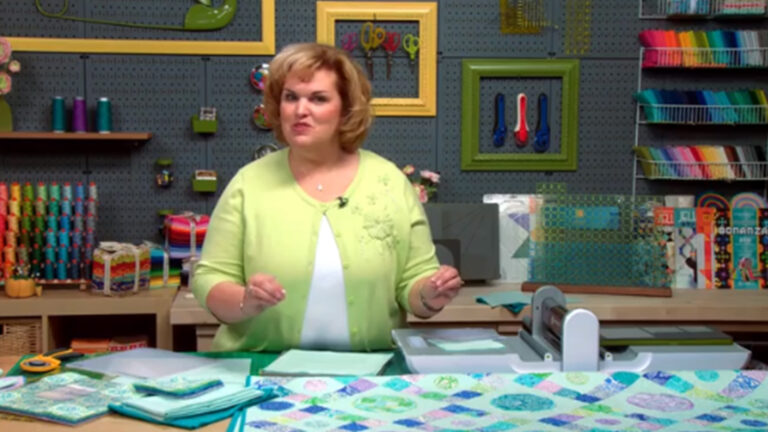
Upgrade your appliqué skills with expert instructor Kimberly Einmo. Get tips for using the AccuQuilt GO! Fabric Cutter to create all the pieces for your projects faster and more accurately (or use scissors!). Create the Lotsa Dots quilt, featuring three sizes of appliqué circles and snazzy twin-needle machine appliqué techniques. Make a custom-fit sewing machine cover as you master complex appliqué shapes to stitch around points and curves with ease. Bring the Good Morning, Sunshine quilt to life with perfect Dresden plates, and use Kimberly's signature stitch-stacking technique to layer threads for spectacular texture and contrast. Swiftly sew extraordinary appliqué projects with speedy die cutting and creative stitching methods!
Meet your instructor, acclaimed quilter Kimberly Einmo, as you jump into a fun and user-friendly project: the Lotsa Dots quilt. Kimberly shares how easy and fast cutting can be with the Accuquilt GO! fabric die cutter, sharing great tips for cutting the appliqué patches and fusing the circles as you work.
Continue working on the vibrant Lotsa Dots quilt as you create a stitch library, which serves as a valuable reference tool that helps you create combinations of thread types, stitch lengths and stitch widths. Next, Kimberly walks you through the process of completing your quilt top, offering valuable construction and material suggestions along the way.
Start an adorable (and useful!) new project: a customized sewing machine cover that keeps dirt away from your machine and adds a pop of color to your craft space. You'll learn how to measure and cut your appliqué shapes and how to create the ties that go on either side of your cover.
Complete the sewing machine cover you started in Lesson 3, using Kimberly's valuable troubleshooting tips for assembling and sewing your pieces as you work. You'll learn how to work with increasingly more challenging appliqué shapes as you finish assembling the cover and quilt it with finesse.
Jump into yet another darling project: the Good Morning, Sunshine quilt. Kimberly walks you through methods for cutting your fabric more efficiently than ever before, including tips for creating perfect points and tiny notches that will make it a breeze to align your blocks.
Complete the Good Morning, Sunshine quilt as you learn how to adhere the wedge pieces, apply Kimberly's delicate-looking tiny appliqué stitches, and fuse the gorgeous sun circles to the center of your blocks. You'll love the helpful tips and techniques Kimberly shares for fusing and finishing your blocks, which you'll be able to apply to numerous projects in the future!
Discover Kimberly's signature stitch-stacking techniques as she walks you through a variety of stitches that you might find too addictive to resist! Next, focus on the best ways to approach quilt construction, and learn how to assess binding as another source of design and artistic creativity.You'll finish the class brimming with new ideas for decorative stitching, efficient cutting and gorgeous appliqués!
Kimberly Einmo
Kimberly Einmo is an award-winning quilter, author and instructor. Her books include Modern Quilts & More, Jelly Roll Quilt Magic and Precuts Bonanza, and she has designed original patterns for numerous publications. Kimberly has also appeared on television programs such as America Quilts Creatively, and teaches quilting workshops in the United States and internationally.
Amazing Applique - Patterns
Bonus Materials available for download after purchase.
Can I purchase a class to keep in my collection?
Yes, we do have a Shop where you can purchase classes to keep. Our Shop items are located under the Shop Tab.
How do I know what the Class covers?
Every Class has a free Preview video you can watch, to give you a flavor of the Instructor and the skills or project that will be covered. In addition, the Overview tab includes a thorough written description of the Class. And finally, each Class Session has a brief written summary of the content in that Session, including the length of each Session video. You will get a good feel for the Class content by reviewing these resources.
Do I have to be a Member of Craftsy to purchase a Class?
No you don’t. While Premium Members will receive regular offers for special deals on Craftsy content, Classes are not reserved exclusively for Members. If you buy a Class as a non-member, we’re sure you’d also enjoy having access to our full library of great projects and articles as a Member, so give it a try.
How do I purchase a Class?
First you should decide that the Class is what you want. Review the Class Preview video and the various written descriptions of the Class and each Session before you purchase, so you have a good understanding of the Class content. When you’re ready to purchase and gain access to the Class, simply click the “Add to Cart” button, and proceed through the Checkout process.
How do I access/view my Class?
Once you’ve paid, you can access/view your Class by going to the MY ACCOUNT section of Craftsy. The MY ACCOUNT link is in the upper right-hand area of the website. Within your MY ACCOUNT, a section labeled “My Content” is where the class you purchased will appear, including a link to watch the video of your Class. You’ll also receive an email confirmation after your purchase, which will include a link to view your Class. You can access your Class as many times as you wish, and you’ll never lose access to your Account information. Just be sure to “Log In” for access to MY ACCOUNT.
Do I have to take the Class right away?
No. Any Class you buy will be accessible to you always. You can view your Class whenever you want, and you can view individual Sessions in whatever order you like.
Is there a limit on the times I can view my Class?
No. Your access never expires. You can view any Class you purchase as many times as you want, whenever you want.
Can I view a Class on my tablet device or mobile phone?
No problem. Most newer-model smartphones or other mobile/tablet devices with an internet connection are able to play the Class videos. Simply Log In to Craftsy, and you can view any Class you’ve bought through the MY ACCOUNT section. Or, you can click on the “View Class” link within the email confirmation you’ll receive upon your purchase.
How do I get access to the Bonus Materials for the Class?
Until you purchase a Class, the Bonus material (any extra videos, download materials, etc.) will not be accessible. Once you purchase a Class, and go to view your Class, each individual Bonus element is accessible by simply clicking on each item. You’ll find the Bonus Materials directly below your main Class viewer frame. You can access the bonus materials as many times as you like and/or save them to your device.
How does the Class Q&A Resource benefit work?
Once you purchase any Class, within the Class viewing page, you’ll have access to post a question, comment or tip in the Class Discussions. This is not a “live chat,” but Craftsy contributors will answer posted questions and provide tips regularly. You can also view other Class participants’ questions and input to take part in this virtual dialogue among others who have taken the Class and are willing to share tips, answers, or ideas.
Can I print out Class details?
For any Bonus Material that is a PDF Download, yes you can. Just click on the icon/button for the Bonus element you want and print with your local printer.
What are PDF downloads?
These are simply documents, plans, or written materials that are formatted in a way to print out and retain for reference. By simply clicking on the icon/link for any PDF Download that is included with a Class, you can print that document on your own printer or simply view the contents on your computer/mobile device.
Are there any system requirements to view the Class video content?
Your Class video content is best when viewed on a computer manufactured in the past couple of years with a good broadband Internet connection (not dialup). We also highly recommend using the latest version of Firefox, Safari, or Chrome as your Internet Browser, though recent versions of Internet Explorer will work as well. The recommended screen resolution is 1024 x 768 or larger.
Why do you need my email?
We need it to acknowledge your purchase of a Class, and send you a confirmation of your transaction. Also, to maintain your permanent access to the Class videos, you’ll need to Log In to craftsy.com. We guarantee that we will not share your email with any third parties. You may receive email updates from Craftsy from time to time, with details of new Classes and updates. You can easily unsubscribe when you receive any email.
Can I get a refund if I don’t like the Class?
Because you’ll have full access to all the materials and content that is presented in the Class immediately, we can’t offer a refund after purchase. Please review the Class Preview video and the various written descriptions of the Class and each Session before you purchase, so you have a good understanding of the Class content.
How do I contact Craftsy?
If your question is about the Class content, please use the Contact Us Link – and you'll receive feedback from the Class Instructor. Even your fellow Class participants may jump in to offer tips and advice from their experience. If you have other questions or need help, you can email us at craftsy@program-director.net or call us toll-free, at 1-888-891-7203 . Customer Service Representatives will be available Monday-Friday, from 8:00 AM to 4:30 PM Central time, excluding normal holidays.
Explore Classes by Kimberly Einmo
You may be interested in
Sign up for our free newsletter today
Get the latest crafting videos, tips, patterns and techniques delivered right to your inbox.